
What is a Cube Gallery layout?
A Cube Gallery layout presents images in equal-sized, square or cube-like blocks that create a balanced, geometric visual structure. Each image feels like part of a solid visual “system,” making the gallery look modern, organized, and highly interactive.
Unlike classic grids, Cube galleries focus on uniformity and rhythm. Every image gets equal visual weight, which makes this layout ideal for clean designs, bold visuals, and websites that value symmetry.
In Re Gallery, the Cube layout is designed to be responsive, fast-loading, and easy to configure, making it a strong choice for WordPress users who want a polished look without custom coding.
Who should use a Cube Gallery layout?
Cube-style galleries are best when visual consistency matters more than image variety.
This layout is especially beneficial for:
- Photographers & visual artists – perfect for curated series or themed collections
- Brand websites – consistent visuals strengthen brand identity
- Ecommerce store owners – showcase product images in a clean, modern grid
- Agencies & studios – highlight work samples in a structured, professional way
- Minimalist blogs & landing pages – add visual interest without clutter
If your goal is to keep everything aligned, modern, and easy to scan, the Cube layout is a great fit.
Step-by-step: Create a Cube Gallery layout in Re Gallery
Step 1: Install and Activate Re Gallery
- Go to WordPress Dashboard → Plugins → Add New
- Search for Re Gallery
- Click Install, then Activate
Step 2: Create a New Gallery
- Open Re Gallery from your WordPress dashboard
- Click Add New Gallery
- Upload or select images from your Media Library
Tip: Cube galleries look best when images share a similar style or color palette.
Step 3: Select the Cube Layout
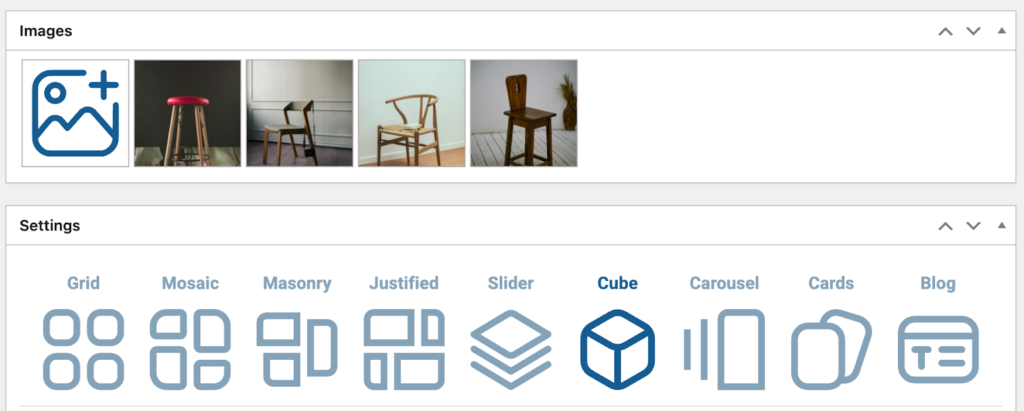
- From your gallery settings, choose Cube layout
- Use the live preview to see how your gallery looks while adjusting settings instantly
Step 4: Customize the Cube Layout Settings
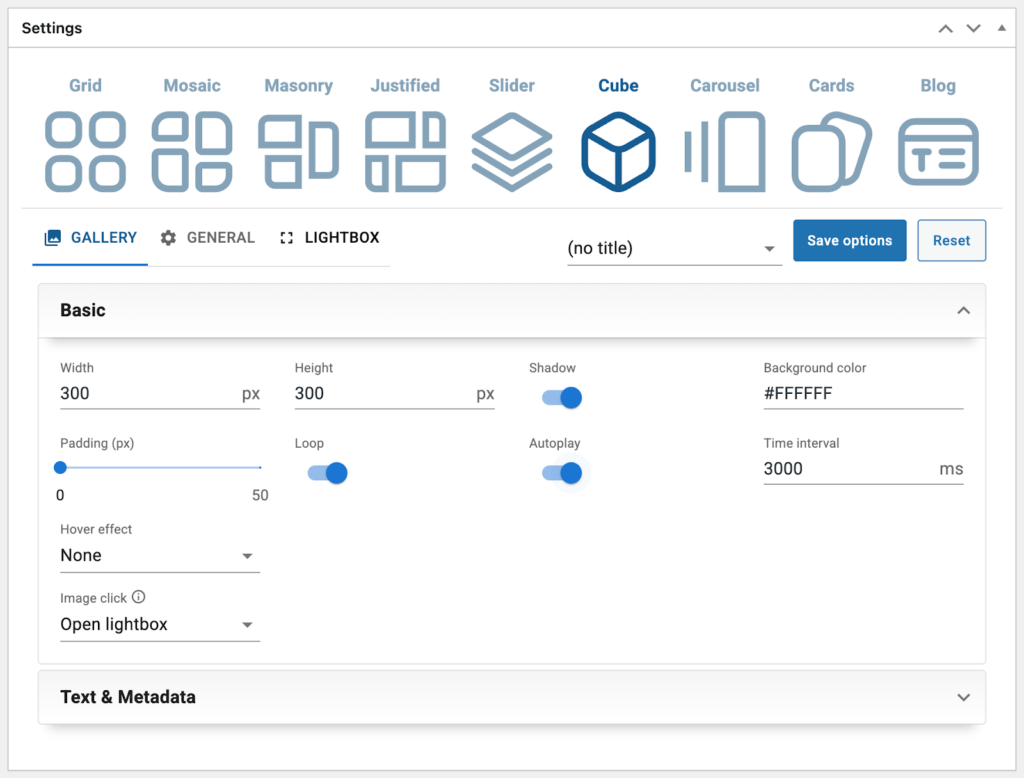
To achieve a clean, professional cube-style gallery, focus on these key options:
- Images width and height
- Padding
- Background color and Shadow
- This will be useful if you are using an image with a transparent background
- This will be useful if you are using an image with a transparent background
- Hover effects
- Subtle zoom or overlay works best
- Subtle zoom or overlay works best
- Loop and Autoplay
- Click behavior
- Open in lightbox for full-size viewing
- Or link each image from the cube to a product, project, or page
Step 5: Optimize Images for SEO
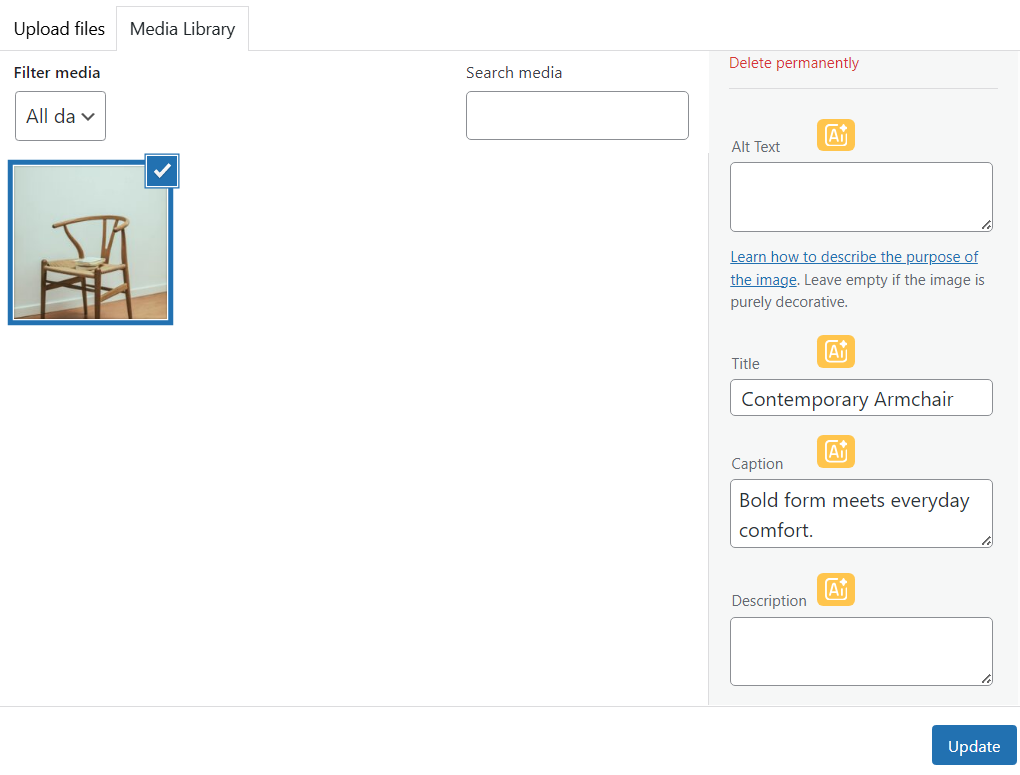
Even minimal layouts benefit from proper SEO optimization:
- Add descriptive alt text to each image to improve accessibility and search visibility.
- Use clear, meaningful image titles that reflect the content of the image.
- Include short captions if relevant (optional for Cube layouts, where visuals are the primary focus).
💡 Tip:
You can also use Re Gallery’s built-in AI tools to automatically generate image titles, descriptions, and alt text based on your visuals — saving time while keeping your galleries SEO-friendly.
Cube galleries often rely more on visuals than text, so alt text is especially important for accessibility and search visibility.
Step 6: Insert the Gallery Into Your Page or Post
- Open the page or post in Gutenberg (or any page builder you’re using).
- Click + Add Block.
- Select the Re Gallery block.
You can also create and publish a Cube gallery directly from the Gutenberg editor. Take a look at our How-to guide. - Choose your Cube gallery and publish the page.
This workflow keeps content creation simple and editor-friendly for WordPress users.
Cube Gallery vs other layouts (quick comparison)
- Cube layout – best for uniform visuals, modern design, and brand consistency
- Grid layout – better for large image collections with varied sizes
- Cards layout – ideal when images need titles and captions
If you want your gallery to feel bold, modern, and visually engaging, the Cube layout is an excellent choice.
It focuses on visual impact and smooth transitions rather than traditional structure.
Best practices for a high-performing Cube gallery
Keep visuals consistent
- Use images with similar lighting and color tones
- Avoid mixing illustrations and photos in the same cube gallery
Videos are supported
You can also add videos to Cube galleries. For the best results, keep them visually aligned with the gallery style.
Optimize for speed
- Upload properly sized images
- Use modern image formats (WebP if available)
- Limit heavy hover animations
Frequently asked questions
Is Cube Gallery mobile-friendly?
Yes. Cube layouts adapt naturally to smaller screens and maintain visual balance on mobile devices.
Can I link each cube to a different page?
Yes. Cube galleries are ideal for clickable navigation-style galleries.
Is Cube layout good for SEO?
Yes, when combined with proper alt text, optimized images, and fast loading, Cube galleries can be SEO-friendly.
Final thoughts
The Cube Gallery layout is perfect for WordPress users who want a clean, modern, and visually balanced photo gallery. With Re Gallery, you can build a cube-style gallery in minutes, no code required, while keeping performance, usability, and SEO in mind.
Creators Who Trust Re Gallery:
https://seo-eho.com/creation-animation-davatars-ia/
https://sages-femmes-arceaux.fr/
https://evaristecatering.com/
https://tokertekstil.com/
https://kruse.sh/portal/