

Images are no longer just decoration.
They can be the reason someone discovers your website.
A person searching for a wedding photographer, a product, a travel destination, a design idea, or a specific visual solution may never begin with a traditional web search. They may begin with an image.
That makes Google Image Search an important — and often overlooked — source of organic traffic.
But simply uploading high-quality images to WordPress isn’t enough.
If you want your images to appear in Google Image Search, search engines need to understand what those images represent, why they matter, and how they relate to the page they’re on.
That means image SEO goes far beyond adding a keyword to an image filename.
You need the right combination of:
- Image quality
- Relevant filenames
- Descriptive alt text
- Captions and surrounding content
- Image titles and descriptions
- Appropriate image formats
- Fast loading times
- Responsive images
- Structured page content
- A well-organized WordPress media library
And when your website contains hundreds or thousands of images, doing all of this manually becomes difficult.
This is where modern tools — including AI-powered image optimization — can change the workflow completely.
What Is Google Image Search?
Google Image Search is Google’s visual search engine, allowing people to discover images related to their searches.
For example, someone might search:
- “minimalist living room ideas”
- “wedding photography poses”
- “black leather handbag”
- “modern architecture portfolio”
- “travel photography Italy”
- “WordPress gallery design”
Google determines which images are relevant by looking at many signals, including the content surrounding the image and the information provided about the image itself.
This means Google doesn’t simply ask:
“Is this a good-looking image?”
It asks something closer to:
“What is this image, what is it about, and how useful is it for this search?”
Your job is to make that answer as clear as possible.
Why Image SEO Matters
Images can contribute to your website’s visibility in several ways.
A well-optimized image can appear in Google Image Search, but it can also strengthen the relevance and usefulness of the webpage where the image appears.
Think of an image as another piece of content.
Your article tells Google what your page is about.
Your image should reinforce that message.
For example, imagine you publish an article about wedding photography ideas.
You have a beautiful photograph of a bride and groom walking through a garden.
If the image is simply called:
IMG_8293.jpg
Google receives very little useful information from the filename.
But if the image has a meaningful filename, descriptive alt text, relevant surrounding content, and an appropriate caption, the relationship becomes much clearer.
The image isn’t just on the page.
It becomes part of the page’s story.
1. Start With the Right Image
Image SEO begins before you upload the image.
The image itself should be relevant to the topic of the page.
This sounds obvious, but it is one of the most important principles.
Don’t choose an image simply because it looks attractive.
Choose an image because it adds meaning.
For example, if you’re writing about:
“How to Design a Photography Portfolio”
a generic stock photograph of a laptop isn’t necessarily useful.
A screenshot of a real photography portfolio, an example gallery layout, or a professional portfolio image is much more relevant.
Ask yourself:
If the text around this image disappeared, would the image still communicate something related to the topic?
If the answer is yes, you’re already starting from a strong foundation.
2. Use Descriptive Image Filenames
Before uploading an image to WordPress, give it a meaningful filename.
Instead of:
IMG_4837.jpg
use something like:
modern-wedding-photography-portfolio.jpg
Instead of:
DSC_1092.jpg
use:
mountain-landscape-sunset.jpg
A descriptive filename gives search engines additional context.
But there’s an important distinction:
Don’t write filenames for search engines.
Write them for clarity.
Avoid:
best-wedding-photography-wedding-photographer-wedding-photos.jpg
That isn’t helpful.
A better filename is:
outdoor-wedding-photography.jpg
Clear. Descriptive. Natural.
3. Write Useful Alt Text
Alt text is one of the most important elements of image SEO.
It provides a textual description of an image and is particularly important for accessibility.
A screen reader can use alt text to communicate the meaning of an image to someone who cannot see it.
Search engines can also use this information to better understand the image.
Poor alt text:
image
Better:
wedding couple walking through a garden
Even better when context matters:
Newlywed couple walking through a garden after their wedding ceremony
The right description depends on the purpose of the image.
Don’t turn alt text into a keyword list
Avoid:
wedding photographer wedding photography wedding photos best wedding photographer
This isn’t useful to people, and keyword stuffing isn’t a good image SEO strategy.
Instead, describe what is actually visible and relevant.
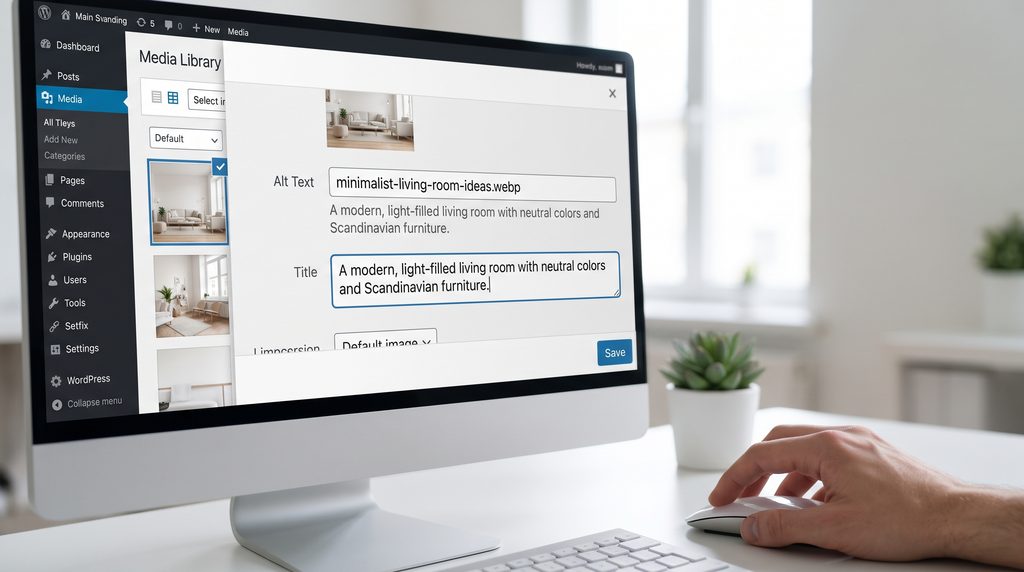
4. Optimize Image Titles, Captions and Descriptions
Alt text isn’t the only information you can optimize.
Depending on how your images are used, image titles, captions and descriptions can also provide useful context.
For example:
Title:
Outdoor Wedding Photography
Alt text:
Newlywed couple walking through a garden
Caption:
An outdoor wedding portrait captured during golden hour.
Each element serves a different purpose.
You don’t need to repeat the same sentence everywhere.
Instead, think of your image metadata as a collection of signals that describe the image from different perspectives.
5. Use Captions When They Add Value
Captions are often overlooked.
But when a caption genuinely helps the reader understand an image, it can strengthen the connection between the visual and the surrounding content.
For example:
Golden-hour portrait session in the Tuscan countryside.
That’s more useful than:
Photo 1
Captions can also encourage people to pause and engage with an image rather than simply scrolling past it.
However, not every image needs a caption.
Use one when it adds context, information, attribution, or storytelling.
6. Compress Your Images Without Destroying Quality
One of the biggest mistakes in image SEO is focusing entirely on discoverability and forgetting performance.
A beautiful image that takes five seconds to load isn’t a great user experience.
Large image files can contribute to slower pages, particularly on mobile devices.
Before uploading images to WordPress:
- Resize images appropriately
- Compress them
- Use modern formats where appropriate
- Avoid uploading enormous files when they’re displayed much smaller
- Keep image quality high enough for the intended use
The goal isn’t:
Smallest possible file.
The goal is:
Best possible visual quality for the smallest reasonable file size.
7. Use Modern Image Formats
Modern formats such as WebP and AVIF can significantly reduce image file sizes while maintaining good visual quality.
If your website contains a large number of images, choosing efficient formats can make a meaningful difference.
But format isn’t the only factor.
An optimized image should also be:
- Correctly sized
- Compressed
- Responsive
- Properly loaded
- Served efficiently
Image SEO and website performance are closely connected.
8. Make Your Images Responsive
People don’t visit your website only from desktop computers.
Your images need to work across:
- Smartphones
- Tablets
- Laptops
- Large desktop displays
A responsive WordPress gallery should adapt images to different screen sizes rather than forcing every visitor to download unnecessarily large files.
This becomes particularly important for photography websites and image-heavy websites.
A beautiful gallery shouldn’t become a performance problem.
9. Create Context Around Your Images
One of the most powerful image SEO principles is also one of the simplest:
Don’t isolate your images from your content.
Imagine you publish an article called:
Modern Architecture Photography: 10 Composition Ideas
And inside the article you show a photograph of a modern concrete building.
The surrounding content discusses:
- architectural photography
- geometric composition
- natural light
- leading lines
- minimalist architecture
Now Google has multiple contextual signals connecting the image to the topic.
The image is no longer an isolated file.
It’s part of a meaningful piece of content.
10. Build SEO-Friendly WordPress Galleries
If your website contains many images, a gallery can become an important part of your image SEO strategy.
But a gallery shouldn’t simply display images.
It should help organize them.
A good WordPress gallery should provide:
- Responsive layouts
- Descriptive image metadata
- Proper alt text
- Fast loading
- Mobile-friendly presentation
- Clean markup
- Easy organization
- A good user experience
This is particularly important for photographers, designers, agencies, travel websites, artists and WooCommerce stores.
11. Automate Image SEO With AI

Here’s where image optimization becomes interesting.
If you have 20 images, writing alt text manually isn’t too difficult.
If you have 200 images, it starts becoming tedious.
If you have 2,000 images, manually creating titles, alt text, captions and descriptions can become a full-time task.
This is where AI image SEO can help.
Instead of writing every description from scratch, AI can analyze an image and create a first draft.
For example:
Image:
A woman sitting at a desk working on a laptop.
AI could generate:
Title:
Woman Working at a Desk
Alt text:
Woman working on a laptop at a desk in a home office
Caption:
Working from a bright home office with a laptop and notebook.
You can then review and adjust the result.
The ideal workflow isn’t:
AI replaces humans.
It’s:
AI removes repetitive work so humans can focus on judgment.
How Re Gallery Makes Image SEO Easier
If you’re using WordPress to manage a large number of images, Re Gallery combines gallery creation with built-in AI image optimization.
Instead of creating a gallery with one tool and then moving to another service to optimize your image metadata, you can work within your WordPress workflow.
Re Gallery’s AI tools can help generate:
- Image titles
- Alt text
- Captions
- Descriptions
This is particularly useful when you’re building photography portfolios, agency websites, WooCommerce stores, travel websites or other image-heavy WordPress sites.
The goal isn’t to automate everything blindly.
It’s to remove the repetitive part.
AI generates. You review. Your website publishes.
12. Don’t Forget Image Context in Your Gallery
A common mistake is optimizing the page but ignoring the gallery itself.
Imagine a page titled:
Best Travel Photography From Italy
and the gallery contains 40 photographs.
Instead of generic metadata such as:
photo 1
photo 2
image 3
give your images meaningful descriptions.
For example:
View of the Amalfi Coast from a hillside at sunset
Narrow street in a historic Italian village
Coastal landscape with Mediterranean buildings
Now the individual images have meaning.
They become discoverable visual content rather than anonymous files.
13. Organize Your WordPress Media Library
A large media library can quickly become chaotic.
Use consistent naming conventions.
For example:
italy-amalfi-coast-sunset.jpg
italy-positano-street.jpg
italy-rome-architecture.jpg
Instead of:
IMG_001.jpg
IMG_002.jpg
IMG_003.jpg
Good organization helps you manage your content long-term and makes it easier to reuse images appropriately.
14. Don’t Optimize Every Image the Same Way
Context matters.
Consider three images on a website.
A product image
The alt text should identify the product.
A photograph in a travel article
The alt text should describe the relevant location or scene.
A decorative background
It may not need meaningful alt text at all.
Image SEO isn’t about filling every available field with keywords.
It’s about making your visual content understandable.
15. Avoid These Common Image SEO Mistakes
❌ Using generic filenames
IMG_1234.jpg
❌ Keyword stuffing alt text
best cheap wedding photographer wedding photos wedding photography
❌ Uploading huge original files
A 12 MB image rarely needs to be displayed at its original resolution.
❌ Using irrelevant images
A visually attractive image doesn’t automatically make it useful.
❌ Writing identical metadata for every image
Every meaningful image deserves context specific to what it represents.
❌ Forgetting mobile users
Your gallery should look and perform well on smaller screens.
❌ Automating without reviewing
AI is powerful, but automatically generated descriptions can occasionally be inaccurate.
❌ Treating image SEO as a one-time task
Your image library grows with your website.
Create a workflow you can maintain.
An Image SEO Checklist for WordPress
Before publishing an important image, ask:
Image
☐ Is the image relevant to the page?
☐ Is the quality appropriate?
☐ Is the file size optimized?
☐ Is the image appropriately sized?
Metadata
☐ Does the filename describe the image?
☐ Is the alt text accurate?
☐ Is the title useful?
☐ Would a caption add value?
Page
☐ Is the image surrounded by relevant content?
☐ Is the page itself optimized for the topic?
Experience
☐ Does the image load quickly?
☐ Does it look good on mobile?
☐ Does the gallery work correctly?
☐ Is the image accessible?
The Bigger Idea Behind Image SEO
It’s tempting to think about image SEO as a checklist.
Rename the file.
Add alt text.
Compress the image.
Done.
But the deeper principle is different.
Search engines are trying to understand content.
Your job is to make your content understandable.
An image without context is difficult for machines to interpret.
An image with a meaningful filename, descriptive alt text, relevant surrounding content, appropriate metadata and a fast, accessible presentation tells a much clearer story.
And that’s what good image SEO really is:
Not manipulating search engines.
Making your visual content easier to understand.
Make Every Image Work Harder
Your images already contain information.
Image SEO simply helps you communicate that information.
For a small website, you can optimize images manually.
For a growing website with hundreds or thousands of images, automation can make the process dramatically easier.
With Re Gallery, you can create beautiful WordPress galleries while using AI to generate image titles, alt text, captions and descriptions — helping you spend less time on repetitive metadata and more time creating valuable content.
Beautiful galleries shouldn’t come at the expense of discoverability.
And image SEO shouldn’t require hours of manual work.
Create. Optimize. Organize. Let your images be discovered.
Try Re Gallery for WordPress and turn your image library into a smarter, more searchable part of your website.